
Installation & Uninstallation
Application Installation and Uninstallation
This document details the GMSSH application installation and uninstallation process, helping developers understand the complete application lifecycle management process.
Application Installation
Installation Process
When users install an application from the Application Center, the system executes the following steps:
- Download Application Package: Download the application installation package to the user's server
- Extract and Install: Automatically extract to the specified directory
- Directory Structure: The application will be installed at the following path:
/.__gmssh/plugin/{org-name}/{app-name}/- Create desktop shortcut
Installation Directory Description
{org-name}: Unique identifier for the developer or organization{app-name}: Unique name of the application
Notes
- Ensure your developed application name is unique within the organization
- Avoid using system-reserved directory names
- Application names should comply with file system naming conventions
Application Uninstallation
Uninstallation Process
The application uninstallation process includes the following steps:
- Check Uninstall Script: The system will look for the
uninstall.shfile in the application directory - Execute Uninstall Script: If an uninstall script exists, the system will automatically execute it
- Clean Application Files: Decide whether to clear application data based on user selection
- Delete Application Directory: After executing the sh script, delete the application directory
Environment Variable Configuration
Before executing the uninstall.sh script, the system will set the following environment variables:
| Variable | Type | Description |
|---|---|---|
IsClean | boolean | Whether the user chose to clear application data |
true: User checked "Also delete application data (including settings/local files)"false: User did not check, retain application data
Uninstall Script Example
Create an uninstall.sh file to handle application uninstallation logic:
#!/bin/bash

# Stop application service
echo "Stopping application service..."
# Add commands to stop service here

# Decide whether to clear data based on IsClean environment variable
if [ "$IsClean" = "true" ]; then
    echo "Clearing application data..."
    # Delete configuration files
    rm -rf ./config/
    # Delete log files
    rm -rf ./logs/
    # Delete user data
    rm -rf ./data/
else
    echo "Retaining application data"
fi

echo "Application uninstallation complete"
User Interface Description
Users will see the following options when uninstalling an application:
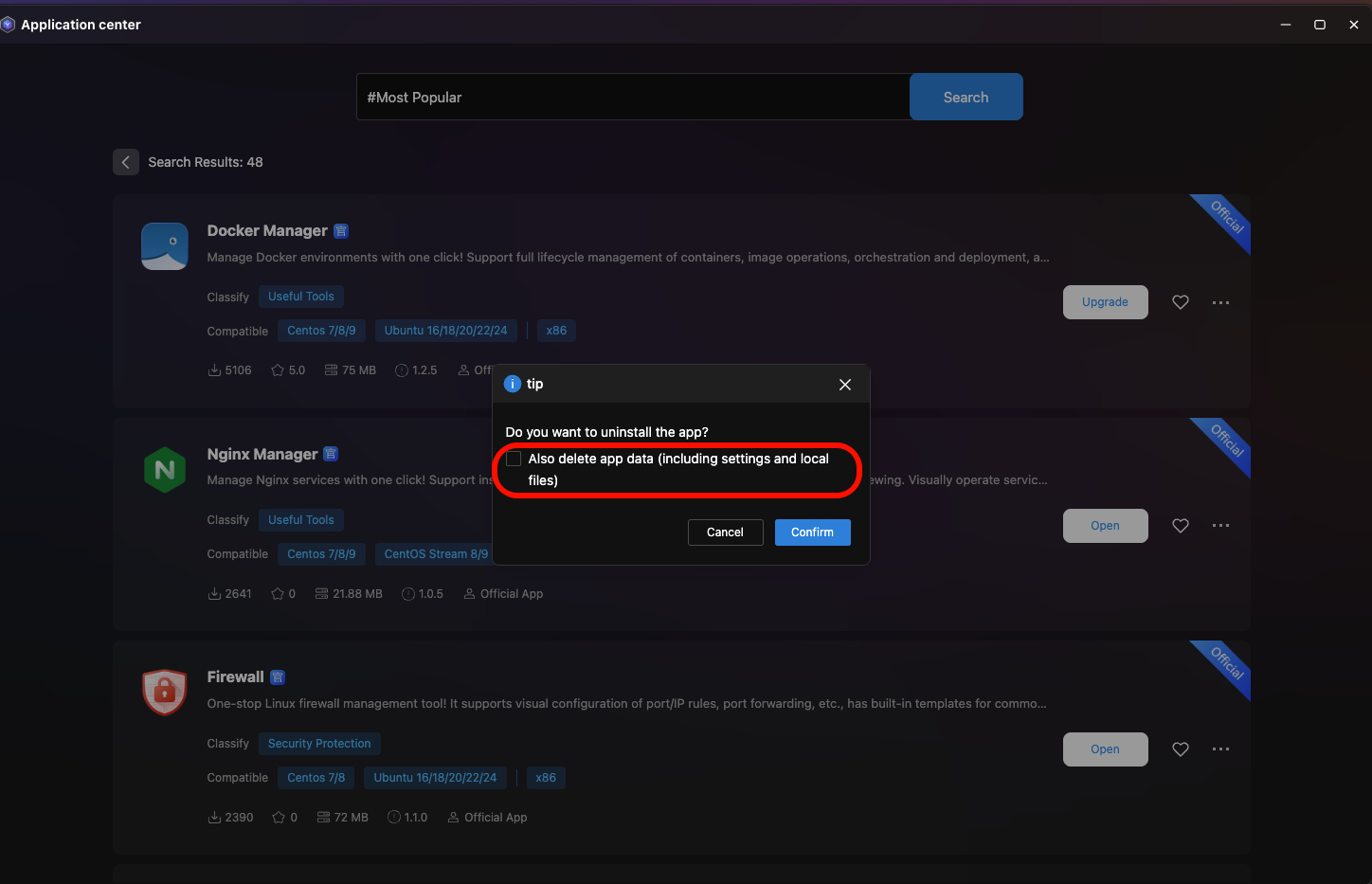
When the user checks "Also delete application data (including settings/local files)", the IsClean environment variable will be set to true.
Development Recommendations
- Always provide an
uninstall.shscript to ensure the application can be properly uninstalled - Properly handle service stopping and resource cleanup in the uninstall script
- Reasonably handle user data retention or deletion based on the
IsCleanvariable - Add appropriate log output for troubleshooting